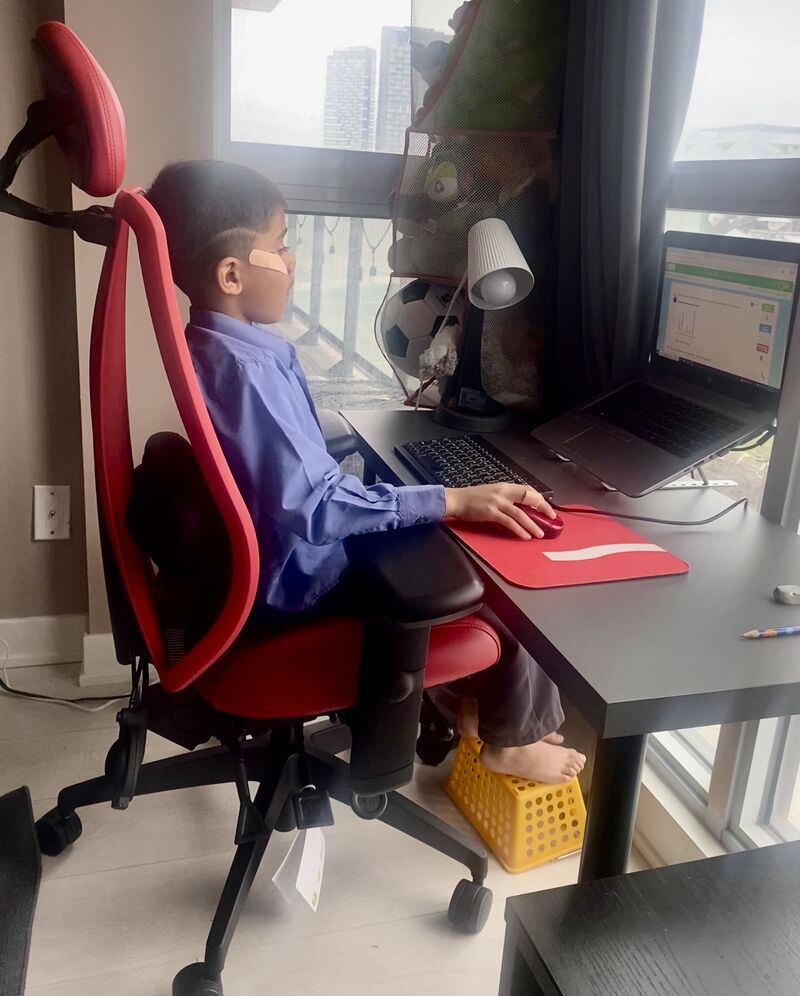
When we think about ergonomics, we often associate it with office workers and adults spending long hours at a desk. But children spend an increasing amount of time using computers, tablets, and other devices—whether for schoolwork, homework, gaming, or creative activities. Teaching children good ergonomic habits early can help them develop healthier posture and more comfortable work habits as they grow. The good news? A child’s workstation doesn’t have to be expensive or complicated. A few simple adjustments can make a significant difference.
Start with the Right Desk Height:
Ideally, when a child is seated, their elbows should be approximately level with the desk surface so that the shoulders are relaxed. This allows the child to use the keyboard and mouse without having to shrug their shoulders or reach excessively forward. Here, an adjustable chair or desk can be particularly useful. If you don’t have an adjustable chair or desk to achieve the desired height, you can use a seat cushion to prop the child or consider a clamp-on keyboard / mouse tray to lower the keyboard / mouse.
An External Keyboard and Mouse Can Make a Big Difference:
Laptops are convenient, but they aren't designed to provide an ideal ergonomic position for prolonged use. The screen and keyboard are permanently attached, which creates a compromise: positioning the screen at a comfortable viewing height often means the keyboard becomes too high, while positioning the keyboard
correctly can force the child to look downward at the screen. A simple solution is to use an external keyboard and mouse. For smaller hands, a compact keyboard and mouse can be particularly helpful. Children shouldn't have to stretch their fingers or reach excessively to operate their devices.
Raise the Laptop:
Place the laptop on a stand or another stable elevated surface so that the top of the screen is closer to eye level. Then position the external keyboard and mouse on the desk. A laptop stand can be useful, but you don't necessarily need to purchase one. At home, look around for something sturdy and stable that can safely raise the laptop to an appropriate height. Depending on the setup, a stack of books, a sturdy box, or another stable household item may work.
Support the Feet:
Children often end up sitting in adult-sized chairs with their feet dangling because the chair needs to be high enough for them to reach the desk. A footrest can help to ensure that the feet are properly supported with the thighs parallel to the floor. And again, it doesn't have to be fancy. A small sturdy box, stack of books, or even an overturned storage container / basket can serve as a makeshift footrest.
Good ergonomic habits can start small—but they can last a lifetime!
Farzana is a Canadian Certified Professional Ergonomist (CCPE). She provides ergonomics services for Office, Industrial and Service environments including: Ergonomics Risk Assessments (in-person / virtual), Physical Demands Analyses (PDAs), and Ergonomics Training sessions and webinars. To receive more information about the ergonomics services at Athlete's Care or to request an ergonomics assessment of your workstation, please email ergonomics@athletescare.com.
**Some group insurance providers and/or employers may cover the cost for an ergonomics assessment. Please check with your group insurance provider and/or employer.



 Appointments Available Today
 Book An Appointment